ภาษา · Language · 语言
01 · Massage shop system for two branches 02 · LÉVONNE website 03 · Nail salon system 04 · Car park system ← Back to home Call 061-684-9793

SELECTED WORK · 04 PROJECTS

Work I built myself
from thefirst screen
to the numbers that must add up

These are not decorative mock-ups — they are real screens from work I designed and coded myself, both websites and back-office systems. Different businesses, but the same principle: the system must follow how the shop actually works

The figures and names in the back-office system screenshots aresample data The live system has this mode for demos and training to avoid exposing real customer data — the sales figures shown are not the price of building the system Work starts at 9,800 THB, depending on the features chosen and the systems it must connect to

01 · SYSTEM · MASSAGE

A massage shop with two branches — the owner opens one screen and immediately knows what to check first before closing

An owner with two branches is not on site all day. What they want is not a twenty-column table but three answers: how much came in today, who is doing what, and is there anything urgent. This system answers those three first, then goes into detail.

Screen 01 · All-branch overview

Bookings, staff, money and where the shop is losing out — all on one screen

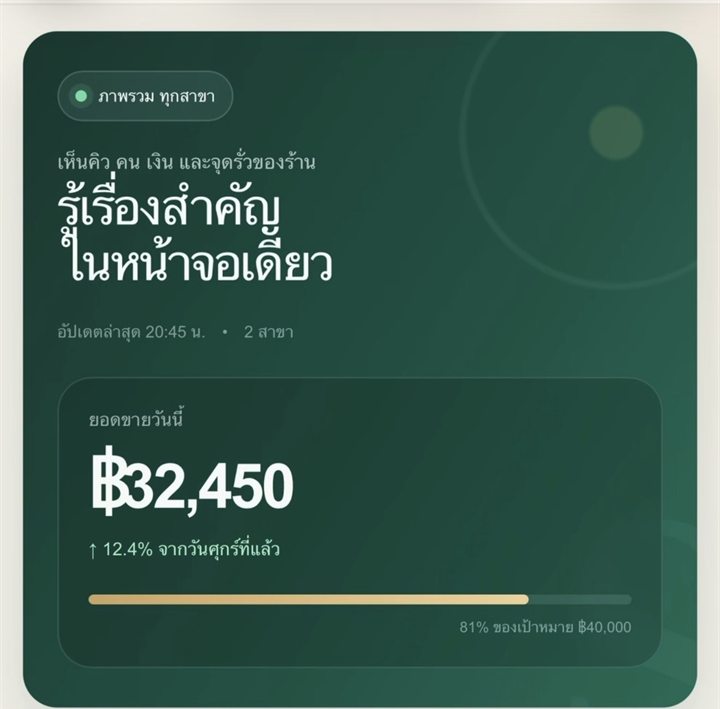
Today’s sales against the same day last week and against target — the gold bar shows 81% of the ฿40,000 goal reached, with no mental arithmetic needed

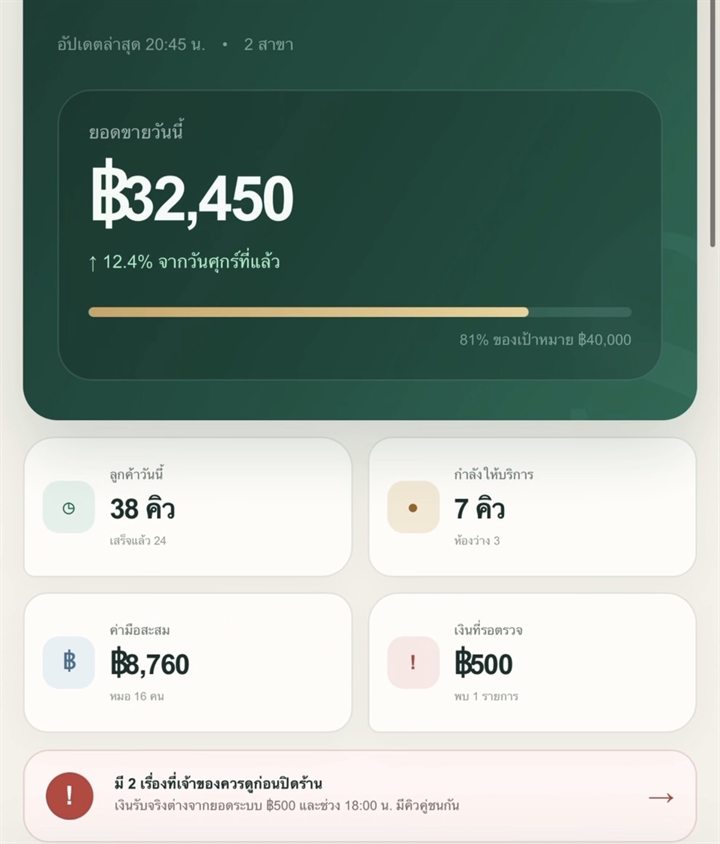
  • 38 bookings today 24 finished — both the count and the progress are visible
  • 7 in service now 3 rooms free — you instantly know whether you can take more walk-ins
  • ฿8,760 in accumulated therapist pay for 16 therapists — the amount to pay at the end of the day is already calculated
All-branch overview — today’s sales 32,450 THB, up 12.4%, at 81% of target

Screen 02 · What to check before closing

The system finds where the shop is losing out and explains it to the owner in plain language

The red bar at the bottom is the heart of this screen — "2 things the owner should check before closing". The system works out what they are, so nobody has to dig through reports

The amount actually received differs from the system total by ฿500 — a five-hundred baht gap is enough to turn it red, because money that does not match gets harder to trace the longer you wait andPaired bookings overlap at 18:00, and there are not enough therapists — flagged in advance with a "See the fix" button, not discovered while the customer is standing there waiting
Today’s summary cards — 38 bookings, 7 currently being served, 8,760 THB in accumulated therapist pay, 500 THB awaiting review, and 2 alerts to check before closing

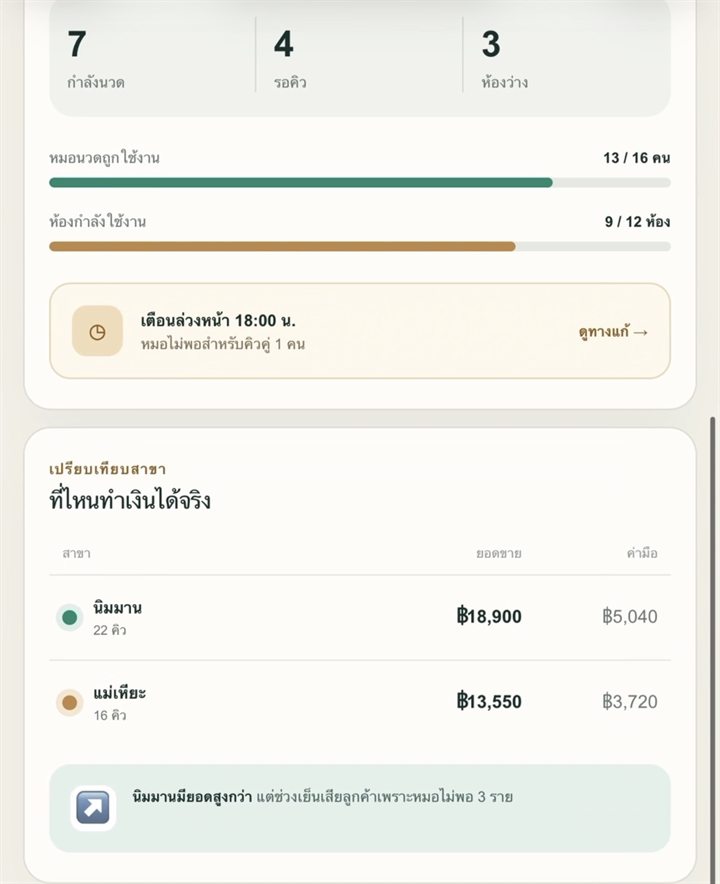
Screen 03 · Branch comparison

Which branch actually makes money — with sales figures and reasons customers are being lost

Both branches sit side by side on revenue, bookings and therapist pay, and the system writes a one-line summary

  • Therapists currently working: 13/16 · Rooms in use: 9/12 — you can see whether the bottleneck is people or rooms
  • "Nimman has higher sales, but lost 3 evening customers because there were not enough therapists" — the system turns it into a sentence the owner can act on, such as moving a therapist from the other branch for the evening
Branch comparison — Nimman: 18,900 THB from 22 bookings; Mae Hia: 13,550 THB from 16 bookings, with a summary explaining that Nimman lost 3 evening customers because there were not enough therapists
All-branch overview What to check before closing Branch comparison

click to zoom

02 · WEBSITE · LÉVONNE

A website selling the Day & Night sunscreen set — making the brand look premium from the first screen

LÉVONNE is a cosmetics brand. The brief was a site as premium as the product itself, one that closes the sale in chat. I built both the site customers see and the back-office sales system the team uses to take orders.

Screen 01 · Home page

Black and rose gold to match the brand, not a template everyone uses

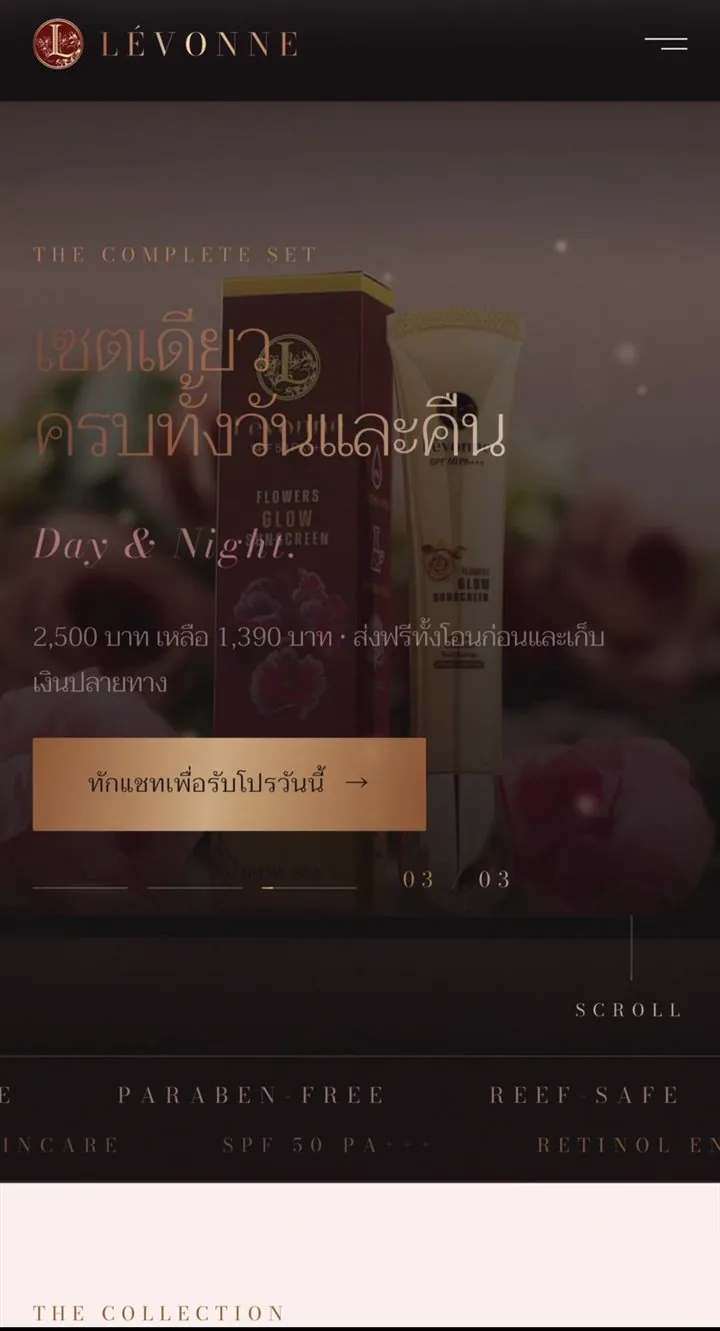
A serif headline, "One set, day and night", with the real product as the hero. The promo price and the chat button are on the first screen — no scrolling to find them

  • Original and discounted prices on the same line — 2,500 down to 1,390 with free shipping. Customers see the value before they tap anything
  • A scrolling feature strip — Paraben-free · Reef-safe · SPF 50 PA+++, readable without opening another page
  • Slide 03/03 is numbered — customers can tell what else there is to view without guessing
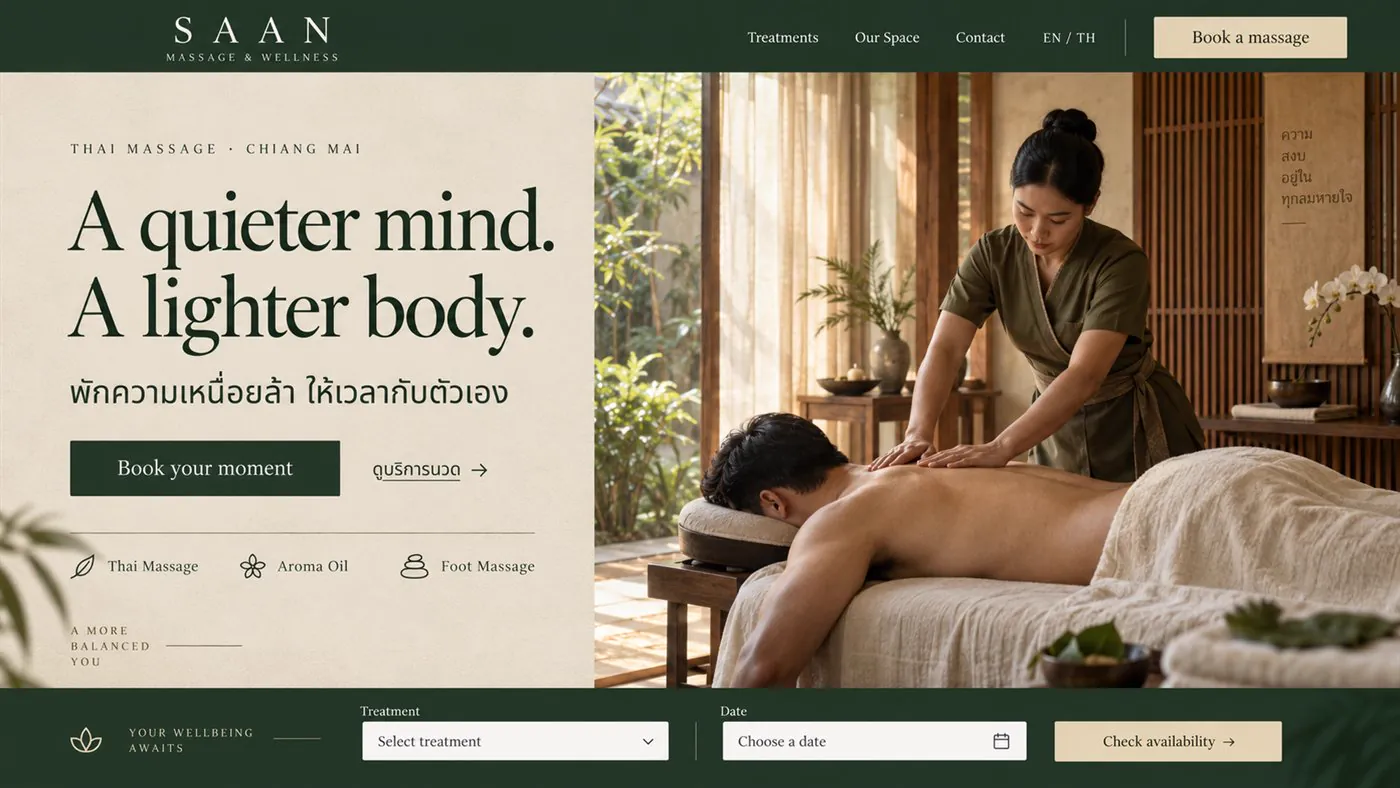
LÉVONNE home page — one set covering day and night, 2,500 down to 1,390 THB, with a chat button for today’s offer

Screen 02 · Telling the product story

A "Morning / Night" toggle shows customers how it is actually used

The set has two items used at different times. Instead of a long explanation, I made it a toggle so people can see what each part of the day involves — "a routine short enough to actually do every day"

A bar fixed to the bottom of every screen — "Set offer 1,390.- · Free shipping with advance bank transfer or cash on delivery", alongside a "Chat now →" button. Wherever customers scroll, they can buy straight away. Most online stores leave this out.
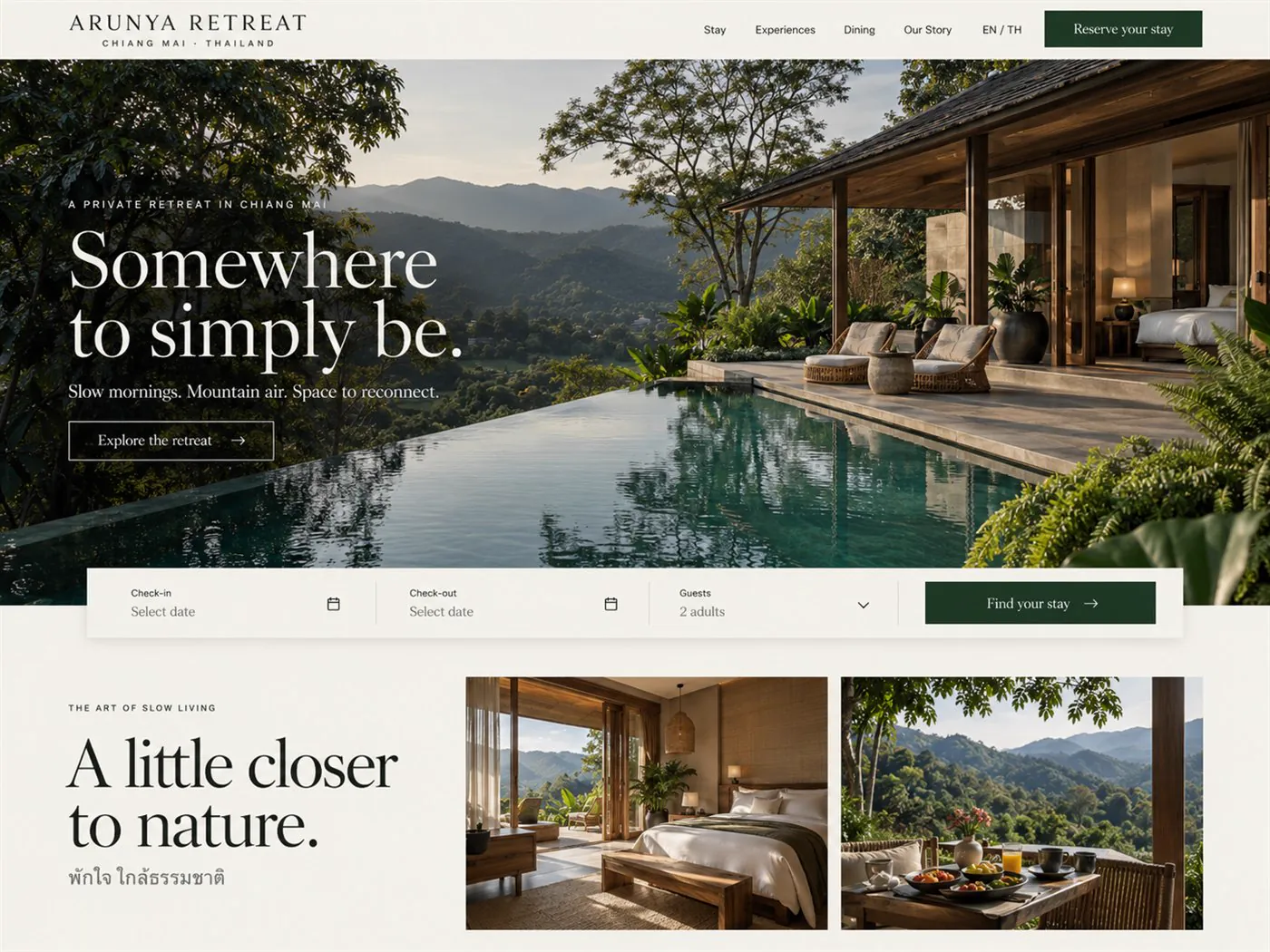
LÉVONNE site — a morning and night skincare routine toggle, sun protection and skincare product images, and a 1,390 THB set-offer bar fixed to the bottom of the screen
LÉVONNE home page Morning / night toggle

click to zoom

03 · SYSTEM · NAIL SALON

A salon with several technicians — every bill has to split correctly

A nail salon bill can include several services performed by different technicians. Add a member discount, and calculating commission by hand at the end of the day becomes the easiest place to make a mistake. This system calculates it at checkout, then checks that the numbers match.

Screen 01 · Today at a glance

Open it and you know how the day is going

Net sales, number of bills, commission percentage and the total commission owed to technicians, all on one screen. Below that are the upcoming bookings with the technician and station assigned

The green bar under the sales figure isthe automatic reconciliation — sales total = total received across payment methods = total allocated by technician. If these three totals do not match, the bar does not turn green. The owner knows that same day, rather than finding out at the end of the month.
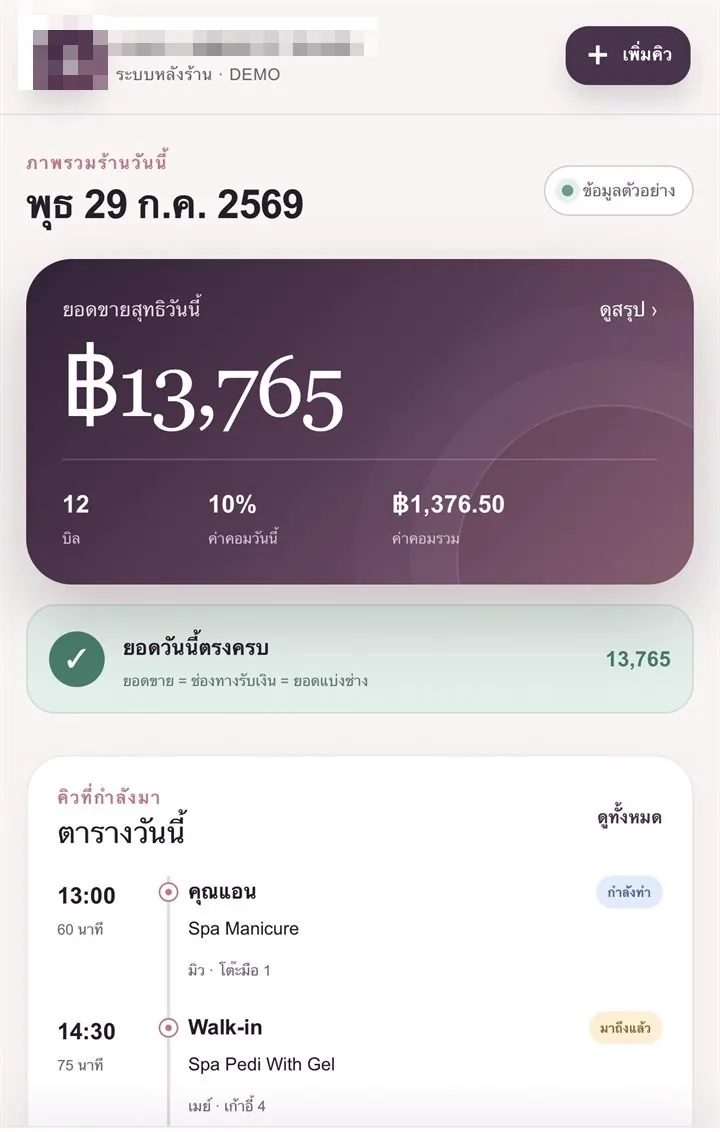
Today at a glance — net sales, number of bills and commission

Screen 02 · Today’s bookings

Today’s bookings, ordered by time and technician

This screen is designed for front-desk staff to use while the customer is standing in front of them, so it must be easy to read and need as few taps as possible

  • Filter to a single technicianso they can see their own bookings without scrolling past everyone else’s
  • Each card states its status clearly — booked / arrived / in progress / finished
  • Tied to a table, chair or bed so bookings cannot clash in the first place
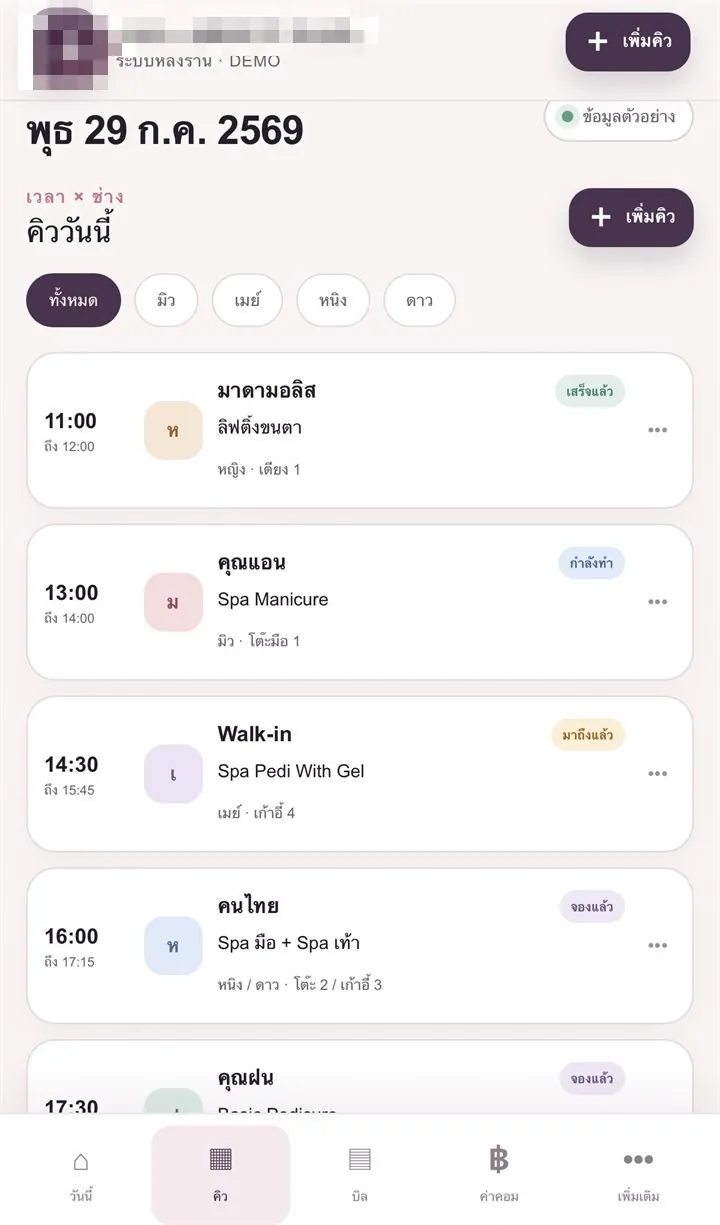
Today’s bookings, filterable by technician, with the status of each booking

Screen 03 · Bill details

One bill, several services, several technicians — the money split is worked out

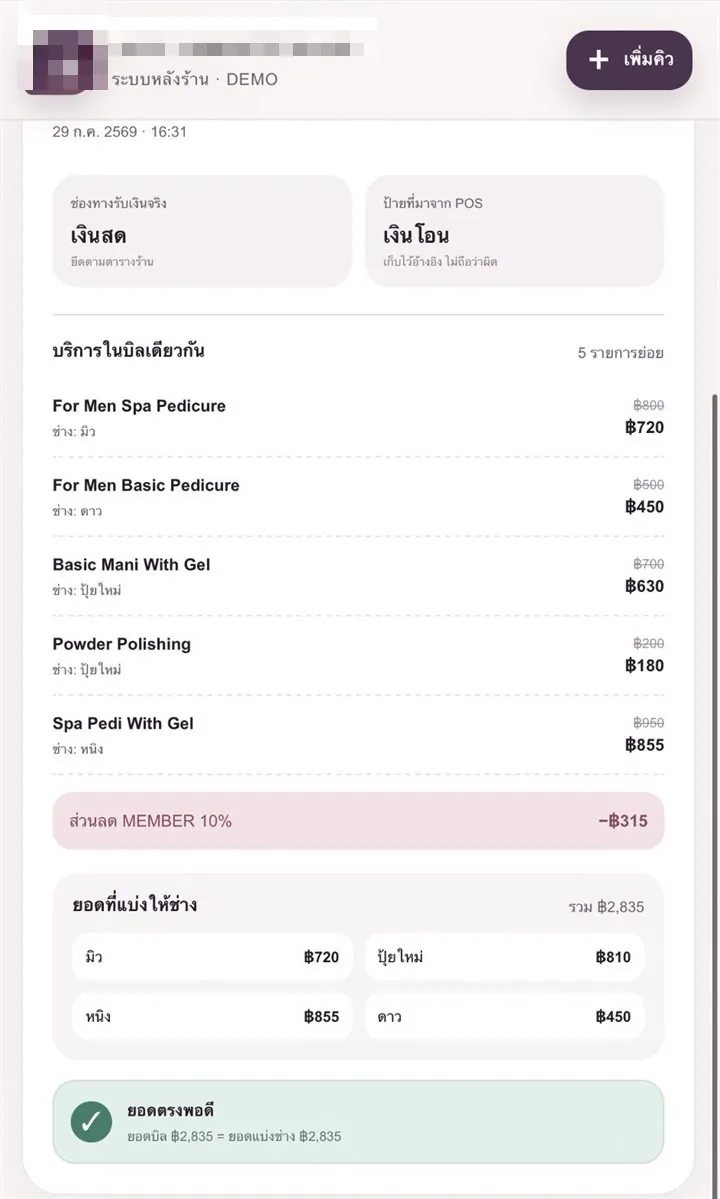
Each line shows the full price, the discounted price and who performed the service. At the bottom of the bill, the system lists the amount allocated to each technician, then checks that the bill total and the allocated total match exactly

A detail only a real shop knows it needs — the system separatesthe payment method actually usedfromthe label coming from the POS machine because staff pressing the wrong option is completely normal. The system keeps both values, treats the real one as authoritative, and does not blame anyone
Bill details — individual services, the member discount, and the amount allocated to each technician
Today at a glance Today’s bookings Bill details

click to zoom

04 · SYSTEM · PARKING

Car park staff and the person handling the finances use different screens, but the same data

Car park staff need quick operation with few taps. The back office needs all the figures. Both cannot fit into one screen. This system therefore has two views, switched with one button, using the same data.

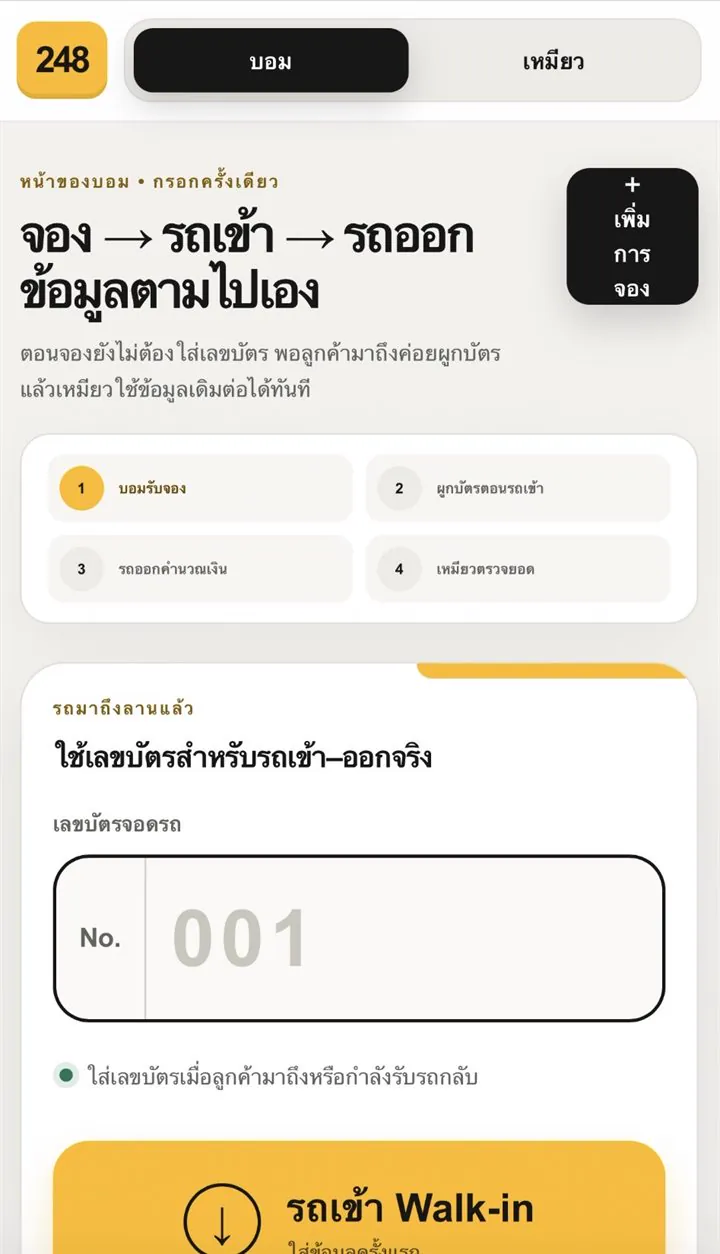
Screen 01 · The car park staff view

Booking → entry → exit, with the data carried along

When car park staff take a booking, they do not yet have all the information: the customer has not arrived and the parking ticket has not been issued. The system therefore does not require every field to be filled in at the start

  • At booking timethe ticket number can be left blank and the ticket is linked to that booking once the customer arrives
  • When the car leaves, the systemcalculates the charge from the actual time parked
  • All four steps form one continuous process. Car park staff enter the information once, and the back office can use it immediately
The car park staff screen, showing booking, vehicle entry and exit, and the linking of parking ticket numbers

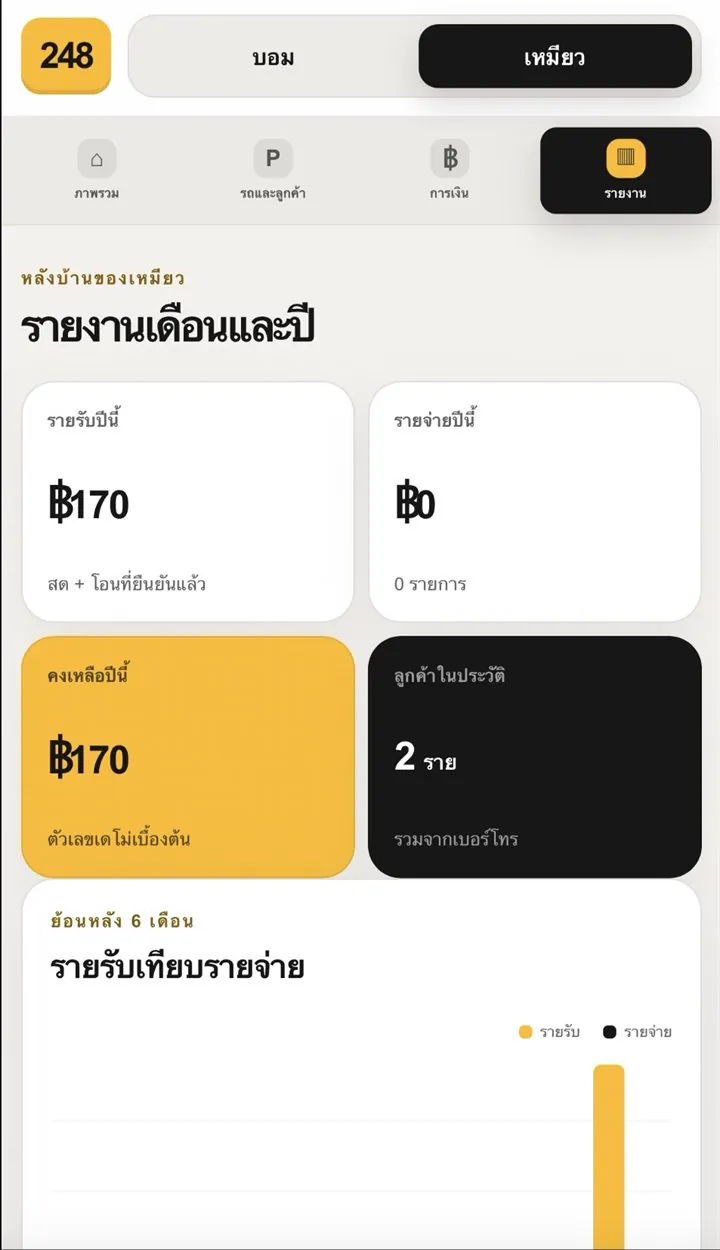
Screen 02 · The finance view

The other role sees only the money

Switch to the other view and you get the back office — income this year, expenses this year, the balance, and the number of customers on record, with a six-month income-versus-expense chart

Splitting the screens by role meansyou do not have to teach the whole system to everyone Car park staff only learn the controls they need, and financial information is not visible to everyone
The monthly and yearly report — income, expenses, balance, and a six-month chart
The car park staff screen The monthly and yearly report

click to zoom

SAME RULES · EVERY PROJECT

These four projects serve different businesses, but I built them using the same rules

Whether it is an online store, a massage shop, a nail salon or a car park, these three go into every job

01

The numbers must check themselves

The system checks that sales, payments received and allocated amounts match. The owner does not have to check each amount manually, and any mismatch is visible that same day

02

Everyone sees only what they need

Screens are separated by role: front-desk staff see bookings and the buttons they need, while the owner sees the finances. Training is easier, and information that should be restricted stays restricted

03

The button you need is always in sight

On an online store, the chat button stays at the bottom of the screen. In a back-office system, the add-booking button is at the top, and urgent issues appear in red at the top — users do not have to search or remember where things are

WANT ONE LIKE THIS?

Tell me where things get stuck in your business

All four projects above started with the same question: how does the business run each day, and where do things slow down? The initial conversation is free.

061-684-9793
📞 Call now 💬 WhatsApp